
Privacy and tracking
Data collection – beyond cookies
When people think about online tracking, they usually think about cookies. But cookies are only one of several ways websites can recognize a browser or connect activity to a person.
IP address
Every time you visit a website, it sees the IP address you are connecting from. An IP address does not necessarily identify one specific person, but it may identify a household, workplace, school or internet connection, which narrows down where a visitor is connecting from.
VPNs, Tor and proxy services can replace your own IP address with another one, making it more difficult to associate browsing activity with your internet connection.
Cookies
Cookies store small pieces of information in your browser.
- First-party cookies remember you when you return to the same website.
- Third-party cookies, where still supported, can allow advertising or analytics providers to recognize your browser across multiple websites.
- Even without third-party cookies, related websites may connect information through shared backend systems.
Cookies are familiar because many websites display a consent banner before storing or using them.
Logged-in accounts and transactions
If you sign in to Google, Facebook, Amazon or another service, that service knows which account is being used.
Information may also be associated with an account through embedded analytics, advertising services, purchases, payment methods, shipping addresses or other interactions. Depending on how services are integrated, information from several websites may contribute to a more complete picture of a user's activity.
Browsing patterns
Even without cookies, browsing behaviour can reveal a surprising amount.
Imagine starting every morning by reading gp.se, a local Gothenburg newspaper. You are no longer being compared with every internet user, but with a much smaller group of people who read that publication.
Next you visit di.se, followed by a particular article on another website. Each additional website, sequence of page visits and article choice can make the pattern more distinctive. In this case "Gothenburg" and "Finance" narrows downs the possible group, bucket of people.
A browsing pattern does not automatically reveal a person's identity, but it can become another useful signal when combined with other information.
Browser fingerprinting
Browser fingerprinting works differently from cookies. Instead of storing an identifier in your browser, a website collects properties exposed by the browser and device.
These properties can include:
- screen resolution and orientation
- browser version and operating system
- language and time zone
- installed or available fonts
- graphics capabilities such as WebGL
- Canvas rendering
- audio-processing characteristics
- many other browser and device properties
None of these values is necessarily unique on its own. When several are combined, however, they may distinguish one browser from many others.
Unlike cookies, browser fingerprinting is usually invisible to the user.
The real issue
The real challenge is not one individual identifier. It is the collection and combination of many small pieces of information.
An IP address reveals one thing. Cookies reveal something else. An account, payment, browsing pattern and browser fingerprint add more signals. Individually, these may be incomplete. Together, they can become much more revealing.
CrowdMe's approach
CrowdMe.One is an experiment based on a simple idea:
Instead of trying to make different browsers on different computer look similar, make them all the same.
Every session receives a newly created disposable virtual computer with the same browser, operating system, language, fonts, screen resolution and settings. No previous user's browser is reused.
When the session ends, the virtual machine is destroyed. Combined with routing internet traffic through Tor, this is intended to reduce the amount of browser state and network information that persists from one session to the next.
CrowdMe.One does not eliminate every tracking method. Logging in, entering personal information or repeating distinctive behaviour can still identify you.
Testing browser fingerprints
One way to understand fingerprinting is to compare several CrowdMe.One sessions started from different devices.
Using FingerprintJS, sessions started from a desktop computer, laptop and iPad produced the same visitor identifier:
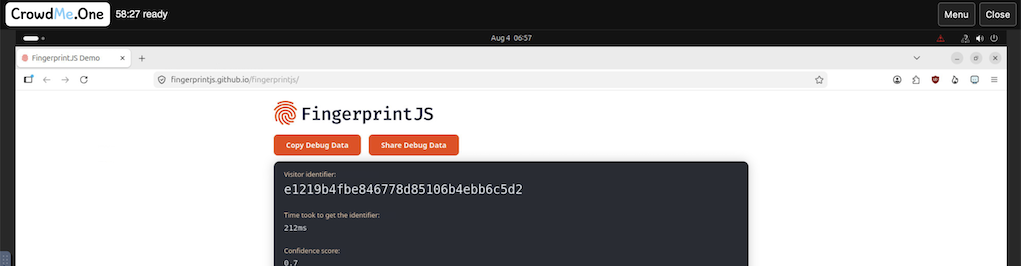
A mobile session initially produced a different identifier:
The mobile session used a smaller resolution and portrait orientation. After changing it to 1920 × 1080 and horizontal orientation using the CrowdMe.One session menu, FingerprintJS returned the same identifier as on the other devices:
This illustrates how screen resolution and orientation can affect one fingerprinting system. FingerprintJS is only one implementation, and other fingerprinting methods may use different signals or produce different results.
Try the tools yourself
No single fingerprinting test tells the whole story. These tools expose different parts of the information available to websites:
Sources and further reading
This article summarizes well-established concepts from browser security, privacy engineering and anonymous communication. The following resources provide additional background:
-
Electronic Frontier Foundation (EFF),
Cover Your Tracks
https://coveryourtracks.eff.org/
Browser fingerprinting tests and explanations of how browser characteristics can contribute to identifying a browser. -
Peter Eckersley,
How Unique Is Your Web Browser?,
Electronic Frontier Foundation, 2010.
https://coveryourtracks.eff.org/static/browser-uniqueness.pdf
One of the first large-scale studies showing that browser configuration alone can often distinguish users. -
BrowserLeaks
https://browserleaks.com/
Collection of browser tests showing information exposed by modern browsers. -
FingerprintJS
https://fingerprint.com/
Documentation describing practical browser fingerprinting techniques. -
Tor Project
https://www.torproject.org/
Documentation describing the Tor network and Tor Browser. -
Tails
https://tails.net/
Documentation for the amnesic operating system designed for anonymous use. -
Mozilla Developer Network (MDN)
https://developer.mozilla.org/
Reference documentation for browser APIs, storage mechanisms and web technologies. -
Jan Jonsson,
Total Surveillance.
https://mullvad.net/pdfs/Total_surveillance.pdf
Start with a fresh browser
CrowdMe.One provides disposable browser sessions with Tor internet access. Each session starts fresh and is destroyed when it ends.